.png?width=150&height=46&name=newlogo-1%20(1).png)

.jpg?width=300&name=The%20Ultimate%20Residents%20Guide%20to%20Salik%20Charges%20in%20Dubai.%20(1).jpg)
Introduction – What Is Salik And Why Do Dubai Residents Need It?
Dubai is an incredible city, offering a combination of modern comfort and traditional culture. However, to ensure safe and efficient travel in the UAE, there are certain laws and regulations that must be followed — one of them being Salik, or “Smooth Traffic Flow”.
Salik is Dubai’s automated toll system managed by the Roads and Transport Authority. Charges vary by toll gate and time of day, and are automatically deducted from your wallet or linked account.
Here you can check the new salik toll update 2026
List of Salik Toll gates 2026
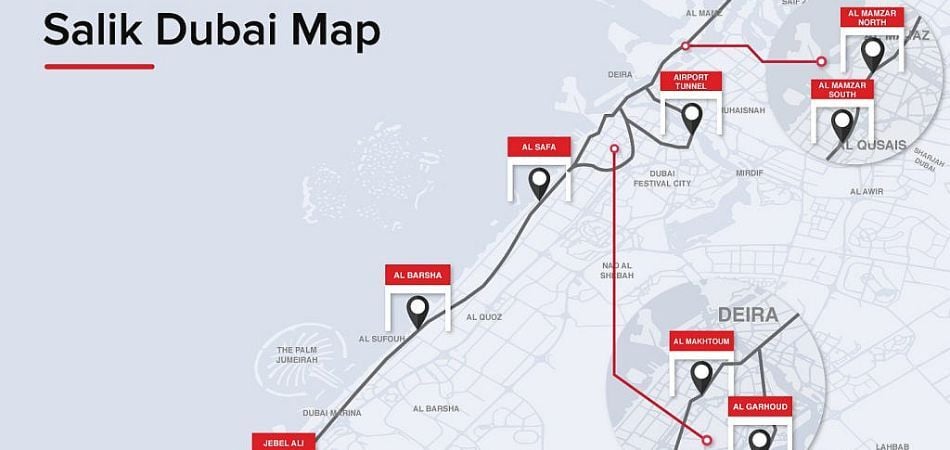
- Sheikh Zayed Road: Interchange 4–5, Trade Centre, Financial Centre
- Al Garhoud & Al Maktoum Bridges
- Al Khail Road & Business Bay Crossing
Note: Check Salik app for latest gate locations
Setting Up A Salik Account – How To Register, The Process, And What You Should Know Before Signing Up
Setting up a Salik account is easy and straightforward. First, you'll need to register your vehicle with the RTA. Once that's done, you can purchase the Salik Tag at any of the authorized distributors or retailers. The registration process requires providing your personal information and choosing a payment option.

It is important to know that each Salik Tag can only be used for one vehicle, so make sure to get a separate Tag for every car registered in your name.
Payments are automatically deducted from your Salik wallet or linked account. The Salik app allows tracking trips, checking balance, and topping up anytime.
Here you can check RTA fine list in Dubai.
Benefits Of Salik – How Can You Make The Most Out Of Your Membership?
Salik offers a multitude of benefits to its users. Firstly, using the Salik Tag significantly reduces waiting time at toll gates, since you no longer need to stop and pay your fare. Secondly, the Tag allows you to conveniently manage and keep track of your payments by linking them to your credit card or bank account. This makes it easy to monitor usage and costs—especially for those who use their cars frequently.
Using Salik saves time at tolls, provides automatic payment tracking, and improves traffic flow.
How to Pay Salik – Simple Methods
1. Salik App / Online
- Link your credit/debit card to your Salik account.
- Payments are automatic at toll gates.
- Enable auto top-up to avoid fines.
2. Prepaid Salik Cards
- Available at RTA centers or authorized outlets (AED 5–500).
- Use until the balance runs out, then recharge.
3. Rental Cars
- Some companies, like eZhire, pay Salik automatically and charge you later.
- Not all rentals include this — check before renting.
Salik Violations & Fines (2026 Update)
If you break Salik rules, you may face fines. Key points:
|
Violation |
Fine (AED) |
|
Insufficient wallet balance (not recharged within 5 days) |
50 per day (max one per vehicle per day) |
|
Unregistered vehicle / no Salik tag |
100 → 200 → 400 (escalating per offence) |
|
Tag tampering/damage to Salik equipment |
Up to 10,000 |
|
Maximum total fines per year per vehicle |
10,000 |
Tips to avoid fines
- Keep your Salik wallet topped up.
- Register your vehicle and tag correctly.
- Replace damaged or faulty tags immediately.
.jpg?width=950&height=450&name=The%20Ultimate%20Residents%20Guide%20to%20Salik%20Charges%20in%20Dubai.%201%20(1).jpg)
Troubleshooting Salik Issues (2026 Update)
If you have a problem with your Salik account or payments, try these quick steps:
1. Check Your Balance
- Open the Salik mobile app or online portal to see your current balance and recent trips.
- If the balance is low, top up immediately to avoid fines.
2. View Your Transactions
- In the app or online, check your transaction history to confirm charges.
- If something looks wrong, note the date/time/plate number.
3. Use In‑App Help
- The Salik app and website have a Help/FAQ section with common solutions.
4. Contact Support
- In the app, use live chat or support request forms.
- You can also contact Salik customer support by phone or email for unresolved issues.
5. Bank/Card Issues
- If using a linked card, contact your bank to confirm there were no declines or blocks.
6. Request a Statement
In the app or online portal, download your invoice or statement to check for discrepancies.FAQ's
Q1. What is Salik?
Salik is Dubai’s electronic toll system managed by the Roads and Transport Authority. Toll fees are automatically deducted when passing designated gates.
Q2. How do I pay Salik?
- Use the Salik app or online portal (linked card/wallet).
- Prepaid cards are still available at RTA centers.
- Rental companies like eZhire may pay tolls automatically.
Q3. How much does Salik cost?
Toll fees start at AED 4 per gate, but may vary by gate and time of day.
Q4. Can I drive without a Salik tag?
Yes, but fines apply if your wallet is not topped up or no tag is linked. Always register your vehicle to avoid penalties.
Q5. How do I check my Salik balance or fines?
- Via the Salik app, online portal, or Dubai Now app.
- Fines and unpaid tolls are automatically displayed.
Q6. How do I cancel my Salik account?
Log in to your account → clear your wallet balance → contact Roads and Transport Authority to request closure.
Conclusion
Salik in Dubai now has variable tolls: AED 6 during peak hours, AED 4 off-peak, and free overnight. Keep your tag registered and your wallet topped up to avoid fines. Using the Salik app or rental auto-pay makes payments easier. With a little planning, you can drive smoothly and save time across the city.